Introducing CodingBooth
Use this with your project and Thank me later
The Problem
Developers who hop between projects collect traces on their machines — a runtime version here, a global CLI there, a shell hook left behind by someone's onboarding script. After a while, those traces start to interfere with each other in ways that are hard to predict.
Three patterns keep costing teams time:
- Project residue. Every project installs something — a JDK version, a Go toolchain, a database client, an SDK. After a few months the host is a graveyard of half-configured toolchains, and two projects that should be independent end up sharing a broken global.
- Legacy projects are punishing. The bigger and older a project is, the harder it is to set up — and even harder to set up the same way as the rest of the team. The onboarding doc is usually out of date, the setup script worked on someone's laptop in 2019, and the version of the build tool that “just works” is no longer published anywhere obvious.
- AI-assisted drift. Coding assistants are great, but they happily suggest
brew install thisorgo install that@latestwhile solving a small problem — and unless someone is paying close attention, those tools land on the host permanently. Multiply that across a year of pairing with an assistant and the environment quietly mutates in ways nobody documented.
All three add up to the same thing: development becomes less repeatable. The
worst part is that the incompatibility is usually subtle — a different minor version, a
missing native lib, a stray PATH entry — so it goes undetected until much
later, often when someone else tries to run the same code.
Production is containerized. CI is containerized. The development loop — where developers actually spend their day — usually isn't. CodingBooth is the missing piece.
Enter CodingBooth
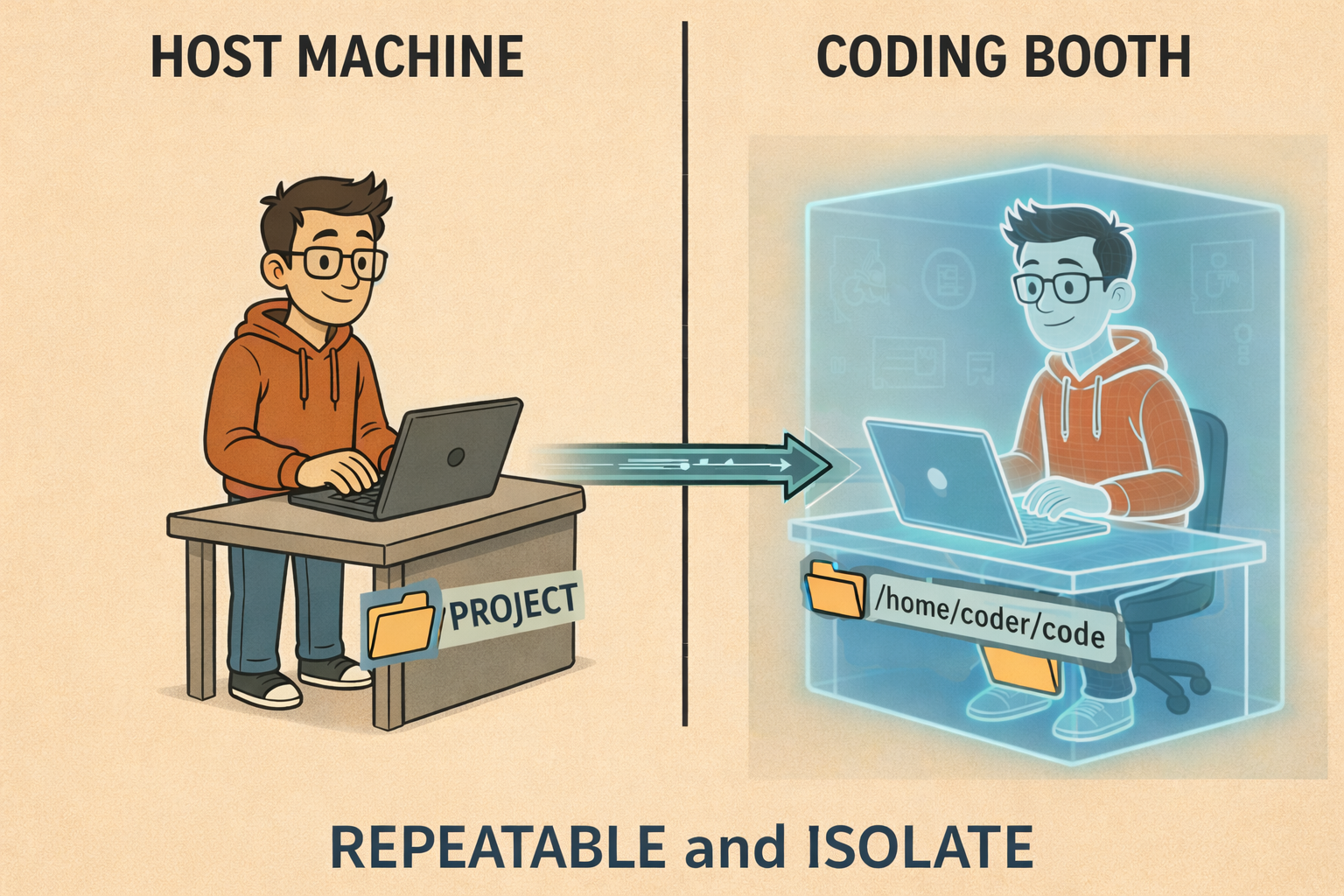
CodingBooth gives each project its own isolated, reproducible development environment — declared in the repo, brought up with a single command, and torn down without leaving residue on the host.
At a very high level, the model is simple:
- Drop a
.booth/folder into your project. Declare the environment there (Boothfile or Dockerfile, plus a smallconfig.toml). - Run
./booth. The booth starts a container whose user is mapped to your host UID/GID, mounts your project into it, and opens whichever front-end you chose. - Edit, build, test inside the booth. Files you create are owned by you on the host
— no
chowndance, no root-owned artifacts.
./boothBecause the environment is declared in the repo, the booth your teammate runs is the same booth you run, on the same image, with the same tools at the same versions. The host stays clean. The project stays portable. The setup stays repeatable.
The simplest form of that declaration is a Boothfile — a high-level, declarative format that compiles down to a Dockerfile. Here is the actual Boothfile that builds the booth this blog is developed in:
# .booth/Boothfile
# syntax=codingbooth/boothfile:1
# Configured by: booth config --no-tui --overwrite --variant codeserver --port 13579 --expose 5173 --select firebase+credential/claude-code+auto-accept+credential+settings-cache

setup claude-code
setup firebase
Two setup lines and the whole development environment for a Svelte + Firebase
blog is declared. Each setup line maps to a curated install script that wires the
tool into PATH and sets sensible defaults — no FROM line, no ARG ceremony, no shell wrangling. If you'd rather use raw Docker, drop a Dockerfile in .booth/ and CodingBooth uses it directly.
The # Configured by: comment is the exact booth config invocation that produced this file — copy-paste it into a shell and you reproduce the
same Boothfile and config.toml from scratch.
Installing CodingBooth itself is one command:
curl -fsSL https://codingbooth.io/install.sh | bashVariants — It's Not Just a Terminal
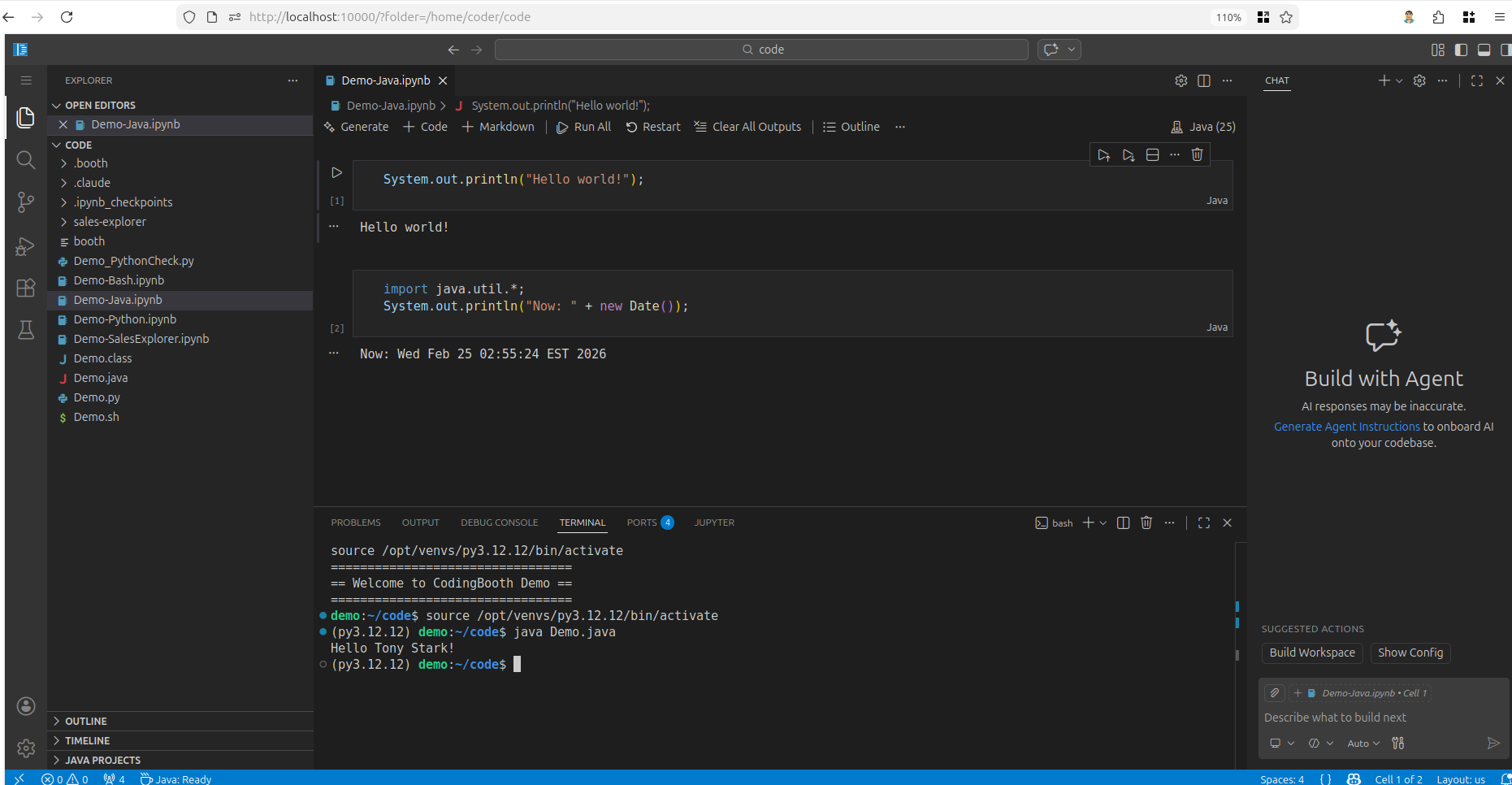
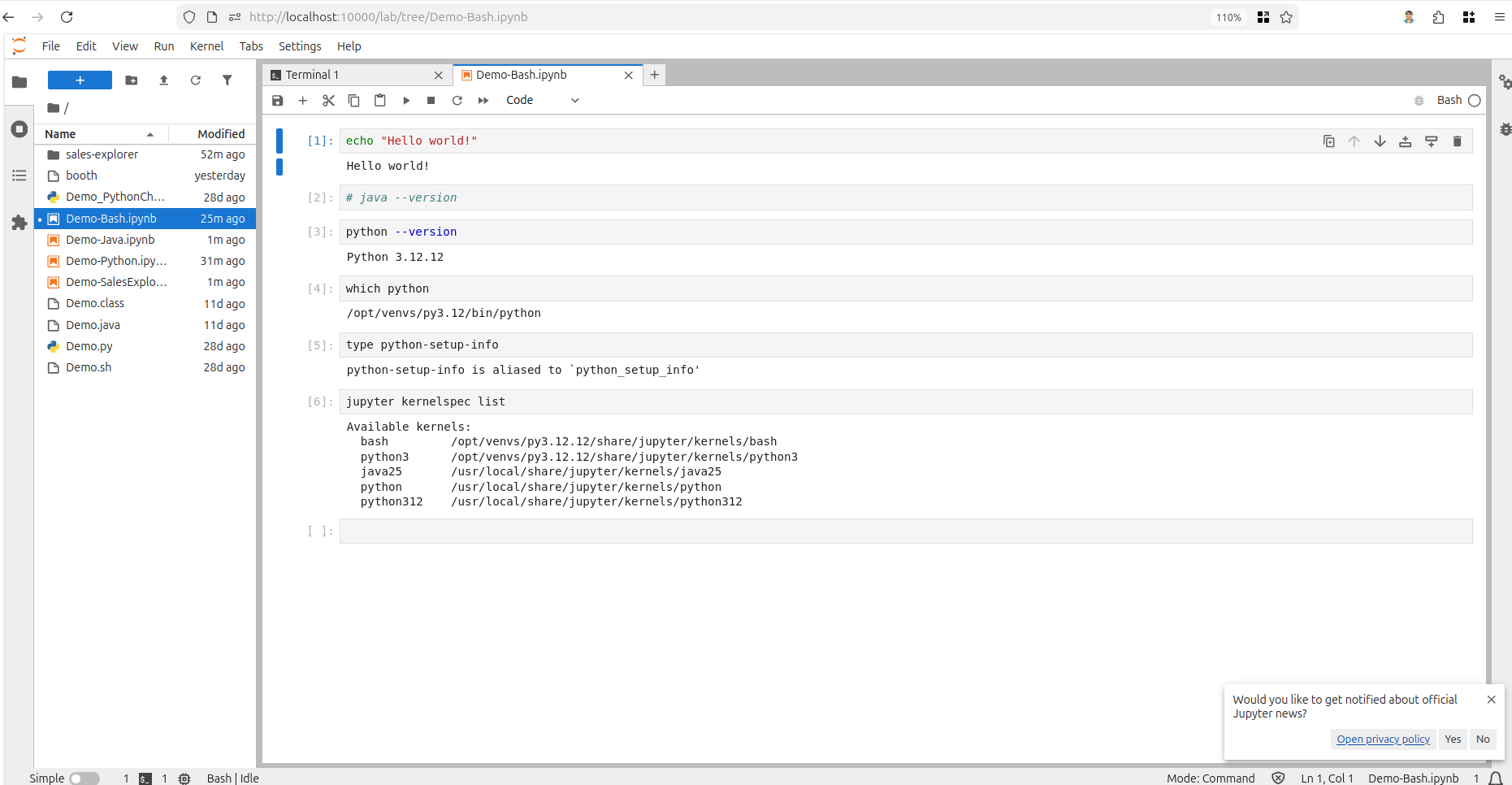
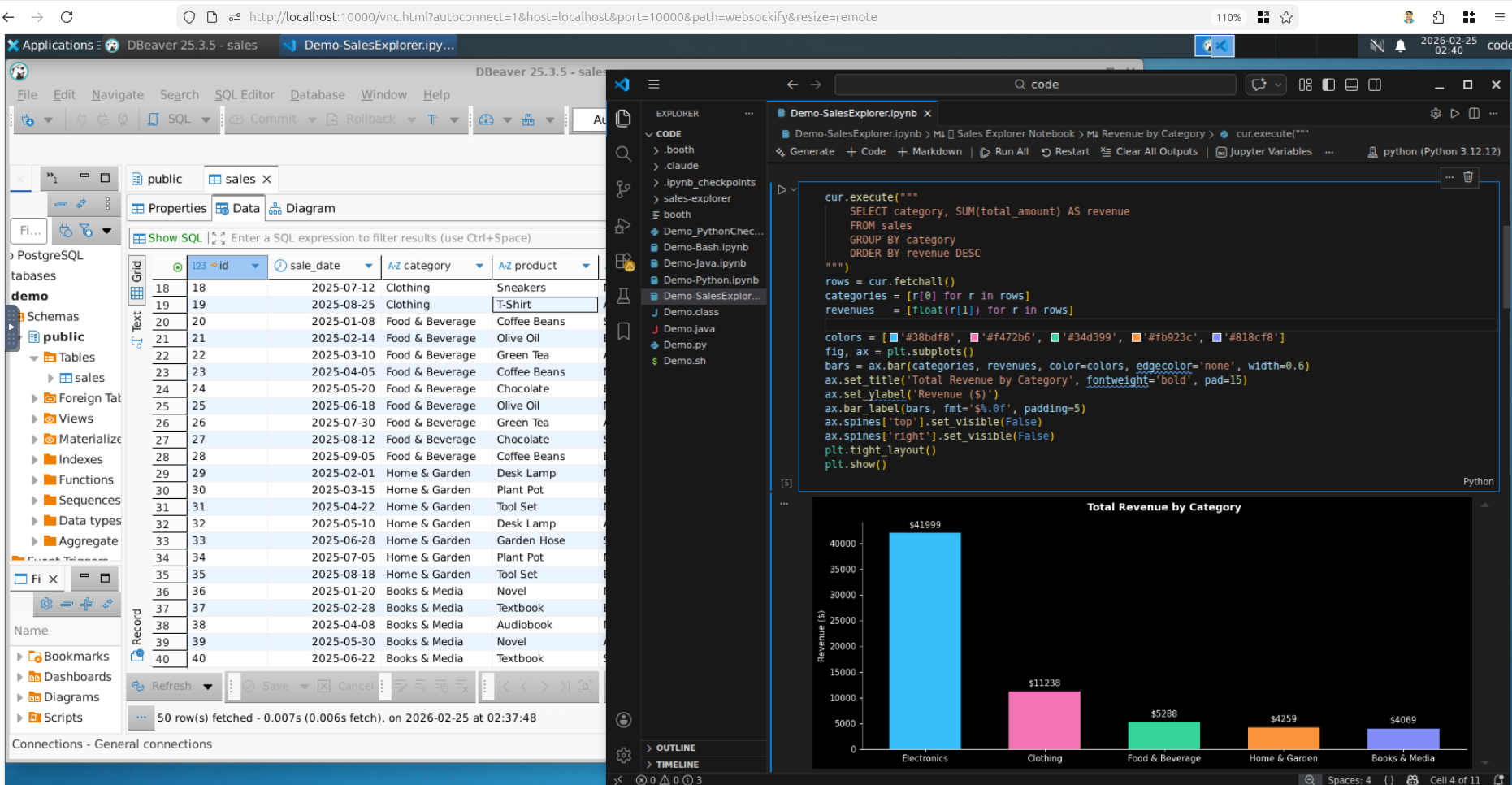
Before going further: a booth is not necessarily a text-only session. That's a common first impression, and it sells the tool short. CodingBooth ships several variants — different front-ends that share the exact same underlying environment:
- base — minimal browser terminal via ttyd
- terminal — direct shell session in your host terminal
- notebook — Jupyter Lab with multi-language kernels
- codeserver — full browser-based VS Code, extensions and all
- desktop-xfce / desktop-kde — a complete Linux desktop in your browser, with GUI apps, file managers, browsers, the lot
Same booth, different UI. You can open today's project in browser VS Code, then re-open tomorrow as a notebook when you want to plot something, then switch to a full desktop variant when you need to run a GUI tool — all without changing the toolchain underneath.
Runtime concerns — which variant to launch, port mappings, volume mounts — live in a
small config.toml next to the Boothfile. Again, here is the actual config.toml for this blog:
# .booth/config.toml
# Configured by: booth config --no-tui --overwrite --variant codeserver --port 13579 --expose 5173 --select firebase+credential/claude-code+auto-accept+credential+settings-cache

variant = "codeserver"
port    = "13579"

run-args = [
    "-v", "~/.config/configstore/firebase-tools.json:/etc/cb-home-seed/.config/configstore/firebase-tools.json:ro",
    "-v", "~/.claude.json:/etc/cb-home-seed/.claude.json:ro",
    "-v", "~/.claude/.credentials.json:/etc/cb-home/.claude/.credentials.json:ro",
    "--publish", "5173:5173"
]
The mounts pass the host's Firebase CLI and Claude Code credentials into the booth read-only
— so deploys and AI assistance just work inside the container without re-logging in. --publish 5173:5173 forwards Vite's dev server back to the host.
If a booth was only ever a glorified terminal, it wouldn't be very interesting. The point is that the environment is the unit of reproducibility, and the UI is just a lens on it.
Config TUI — Setup Without Hand-Writing TOML
Declaring an environment by hand is fine for a small project, but it stops being fun the moment you want Python + a specific IDE + an AI assistant + a credential mount + a database client. CodingBooth ships an interactive Config TUI for exactly that.
booth configThe TUI is a multi-tab terminal interface that lets you browse 130+ templates across categories — languages, IDEs, AI coding assistants, databases, browsers,
desktops, education stacks, and dev tools — toggle the extensions you want, and preview
the resulting .booth/ output before writing it. If a .booth/ folder
already exists, the TUI pre-populates with your current selections so reopening a project
feels like editing, not starting over.
If you'd rather script it, the same selections work non-interactively:
booth config --no-tui \
    --select java+maven \
    --select claude-code+credential
Either way, you end up with a .booth/ folder that someone else — or
future-you — can clone and run with one command.
Try It Quick
The fastest way to feel what a booth does is to try a pre-built example. The catalog ships with dozens of them — including ones that use toolchains you almost certainly don't have on your host:
booth example list
booth example try snake-zig my-snake
cd my-snake
booth
The snake example builds with Zig. Inside the booth you can edit and compile it; the resulting binary lands on the host side, ready to run. No Zig was installed on your machine. Nothing to clean up afterwards. That's the whole pitch in miniature.
Who Benefits
If any of the following describes your week, a booth probably earns its keep:
- Polyglot developers juggling several languages. One booth per project
means no
sdkman/gvm/nvmjuggling and no global version bleed. - Teams onboarding new members. Clone the repo, run
./booth, and you're at parity with the rest of the team on day one — same versions, same CLIs, same defaults. - Maintainers of large or legacy systems. Pin the toolchain to whatever actually still works, in the repo, and stop relying on a setup wiki that nobody updates.
- Educators and workshop runners. Hand out one repository; every student gets an identical environment without a day of platform-specific debugging.
- Researchers reviving old work. Open a dormant project years later and bring up the original toolchain without archaeology on your current machine.
- AI-heavy workflows. Drop
setup claude-codeinto your Boothfile and the assistant runs inside the booth, with a documented agent guide at/opt/codingbooth/AGENT.mdand an optional credential extension that mounts your host login read-only. Let the assistant install whatever it likes — the host stays untouched, and a bad suggestion is oneboothrestart away from being undone. - Solo developers who like a tidy machine. No more graveyard of half-configured runtimes on your laptop just because you tried a tutorial once.
Closing
Even this blog itself — Svelte 5, SvelteKit, Firebase Hosting — is developed inside
a CodingBooth. Two lines of Boothfile, one config.toml, and one ./booth command brings the whole environment up.
“Works on my machine” is a meme because it keeps happening. CodingBooth makes the development loop — the part of the day where developers actually spend their hours — as reproducible as the production container next to it. A booth per project. A clean host. A repo that brings its own environment.
Happy coding!
Nawa Man
Learn More
Website
Deep Dive
https://codingbooth.io/more.html
Comments
Thank you for keeping the comment section positive, constructive and respectful. I appreciate constructive criticism & respectful disagreement!